
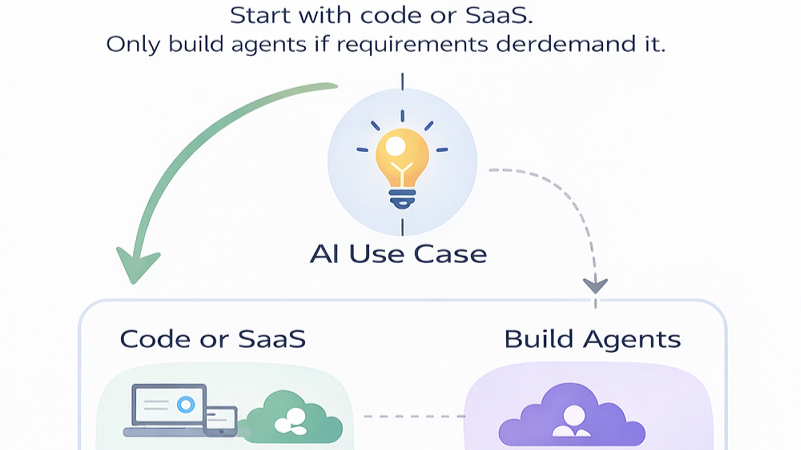
I came across a Microsoft Cloud Adoption Framework diagram that should be required reading for any engineering team thinking about AI agents.
It is basically a decision tree that says: know when not to build an agent. That mindset alone can save a team a lot of time, cost, and avoidable risk.
Over the years, the projects that actually succeed - cloud migrations, security programs, operational transformations, platform builds - tend to have one thing in common: the architecture matches the real problem. The team is disciplined about scope, process, and governance before the technology gets interesting.
AI does not change that. If anything, it makes that discipline more important, because agent systems can hide complexity behind a friendly interface until the first production incident.
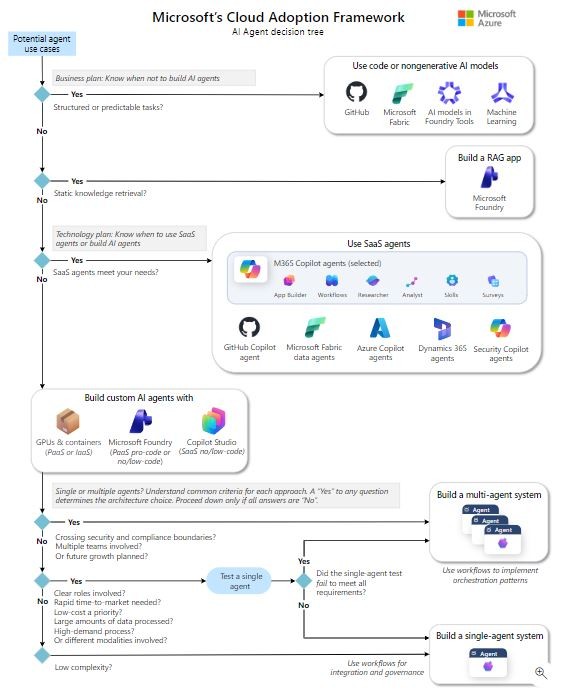
If the task is structured or predictable, do not build an agent
If the work is repeatable - routing, validation, approvals, reconciliation, standard incident response steps - you will often get a better outcome with code, workflows, or traditional automation.
Agents add variability. In production, variability means more monitoring.
More guardrails.
More edge cases.
More surprises at 2am.
Rule of thumb: if you can write it as a deterministic workflow, start there.
That does not mean the system cannot use AI anywhere. A workflow can call a classifier, a summarizer, or a model-backed extraction step. But the overall shape should still be deterministic if the business process itself is deterministic. The model should support the workflow, not become the workflow.
If the problem is answering questions from documents, build RAG before agents
A lot of agent use cases are really knowledge retrieval use cases wearing a more exciting label. If the user needs grounded answers from policies, procedures, tickets, contracts, design docs, or internal knowledge bases, build a proper retrieval-augmented generation system first.
What matters in practice:
- document quality and ownership
- chunking and metadata strategy
- retrieval evaluation, not vibes
- security trimming so users only retrieve what they are allowed to see
- clear freshness and source-of-truth rules
In other words: treat retrieval like a real system, not a demo.
The engineering risk here is subtle. Teams often jump to agent orchestration because it feels more advanced, while the actual failure is poor document hygiene, missing metadata, weak permissions, or no evaluation harness. An agent will not fix those foundations. It will just make the failure more expensive and harder to explain.
If SaaS agents meet the need, use them and move fast
Microsoft is pushing a layered approach: use SaaS agents when they fit - Microsoft 365 Copilot agents, Fabric data agents, Security Copilot, Dynamics 365 agents, GitHub Copilot agents - and only move down the stack when requirements force it.
That is a mature strategy because SaaS tends to come with useful enterprise plumbing:
- identity and permissions already integrated
- admin controls
- auditability hooks
- managed lifecycle and updates
- less platform engineering
If you are trying to deliver value quickly, this matters.
There is a temptation in engineering teams to build because building feels like control. But control has a carrying cost. If a SaaS agent satisfies the functional, security, and compliance requirements, adopting it may be the more disciplined architecture choice.
Build custom agents only when requirements force you to
Custom agents make sense when you need:
- deep integration with internal systems
- strict compliance boundaries
- specialized orchestration
- custom model or infrastructure requirements
- strong audit trails for actions taken, not just chat logs
This is where you are choosing between Microsoft Foundry, Copilot Studio, GPUs and containers, and your own control plane. Those are real platform choices, not cosmetic ones.
My advice: treat a custom agent like any other production platform build. Define standards, change management, rollout patterns, monitoring, incident response, and ownership from day one.
A custom agent that can take action is not just a chatbot. It is an application with reasoning, permissions, tools, data access, and side effects. That means the normal rules of enterprise engineering still apply: least privilege, testability, logging, versioning, rollback, and clear accountability.
Single-agent vs. multi-agent is a governance decision
The Microsoft diagram gets this right: start by testing a single agent and only go multi-agent if the single-agent approach fails requirements.
Multi-agent systems can be powerful, but they increase:
- orchestration complexity
- failure modes
- unclear ownership, especially across teams
- security and compliance boundary headaches
- debugging difficulty when outcomes emerge from agent interaction
Go multi-agent when you must: multiple domains, multiple teams, meaningful separation of duties, or growth that will turn one agent into a tangled monolith.
Do not go multi-agent because it looks impressive in a diagram. Impressive diagrams do not wake up for incident calls. Operations teams do.
The Microsoft AI stack checklist
If you are building on Microsoft's AI stack, I would answer these before writing orchestration code.
Security and identity
- How do Entra ID permissions map to retrieval and tool access?
- What is the least-privilege model for tool calls?
- How do we prevent prompt injection from turning into dangerous actions?
- Which actions require step-up authentication or human approval?
Operations
- What gets logged: prompts, retrieval context, tool calls, outcomes?
- What is the rollback plan when the agent changes behavior?
- How do we monitor quality over time, not just uptime?
- Who gets paged when the agent fails in a business workflow?
Governance
- Who owns the data sources?
- Who approves tool integrations?
- What requires human-in-the-loop?
- How are model, prompt, workflow, and connector changes reviewed?
These are the same fundamentals that make any enterprise system stable. AI does not change that. It raises the stakes.
Why I like this framework
Because it is not hype.
It is an engineering-first approach that pushes teams to:
- pick the simplest architecture that meets requirements
- avoid agent sprawl
- think about governance early
- build something they can actually operate
Agents are not the goal. Reliable systems that improve outcomes are the goal. Sometimes that system will be an agent. Sometimes it will be RAG. Sometimes it will be a SaaS Copilot. Sometimes it will be boring code with good logging.
The discipline is knowing the difference before the architecture hardens.
Reference
Microsoft Cloud Adoption Framework - Technology plan for AI agents
Related reading
AI Agents Need Managers Too
Why project management, agile delivery, and operating discipline become more important as AI agents enter real workflows.
Microsoft's Real AI Power Move Is the Stack
Microsoft's Build 2026 AI announcements point beyond models toward enterprise tuning, inference economics, data centers, and full-stack AI strategy.
The Double-Edged Sword of AI: Implications for Cybersecurity Professionals
A UIUC paper on autonomous LLM website exploitation highlights why cybersecurity teams need stronger monitoring, AI-aware defenses, and ethical AI governance.